Install HertzBeat via Package
You can install and run Apache HertzBeat™ on Linux Windows Mac system, and CPU supports X86/ARM64.
The current branch uses Java 25, and the standard installation package no longer provides a built-in JDK. Use HertzBeat according to the following situations:
- When the default environment variable on your server is
Java 25, you do not need to take any action for this step. - When the default environment variable on your server is not
Java 25, such asJava 8,Java 11, orJava 21, and if there are no other applications on your server that require a lower version of Java, downloadJava 25from https://www.oracle.com/java/technologies/downloads/ according to your system, and set a new environment variable pointing toJava 25. - When the default environment variable on your server is not
Java 25, such asJava 8,Java 11, orJava 21, and you do not want to change the environment variable because there are other applications on your server that require a lower version of Java, downloadJava 25from https://www.oracle.com/java/technologies/downloads/ according to your system, rename the extracted folder tojava, and then copy it to the HertzBeat extraction directory.
Deploy HertzBeat Server
-
Download installation package
Download installation package
apache-hertzbeat-xxx-bin.tar.gzcorresponding to your system environment -
Configure HertzBeat's configuration file(optional)
Unzip the installation package to the host eg: /opt/hertzbeat
tar zxvf apache-hertzbeat-xxx-bin.tar.gztipThe configuration file is located in
config/application.yml, you can modify the configuration file according to your needs to configure external dependent services, such as databases, time series databases, etc. HertzBeat defaults to using internal services when started, but it is recommended to switch to external database services in production environments.It is recommended to use PostgreSQL for metadata storage and VictoriaMetrics for metric data storage. Specific steps are as follows
-
Configure the account file(optional)
HertzBeat default built-in three user accounts, respectively
admin/hertzbeat tom/hertzbeat guest/hertzbeatIf you need modify account or password, configureconfig/sureness.yml. For detail steps, please refer to Configure Account Password -
Start the service
Execute the startup script in the installation directory
bin/, orstartup.batin windows../startup.sh -
Begin to explore HertzBeat
Access http://ip:1157/ using browser. You can explore HertzBeat with default account
admin/hertzbeatnow!
Deploy HertzBeat Collector Cluster(Optional)
HertzBeat Collector is a lightweight data collector used to collect and send data to HertzBeat Server. Deploying multiple HertzBeat Collectors can achieve high availability, load balancing, and cloud-edge collaboration of data.
If your monitoring workload does not depend on external JDBC drivers from ext-lib, prefer the native collector package for faster startup and lower memory usage. MySQL, MariaDB, and OceanBase can also use the native collector package directly when mysql-connector-j is not provided. TiDB follows the same rule for its SQL query metric set.
Before choosing it, review the trade-offs in Native Collector Guide.
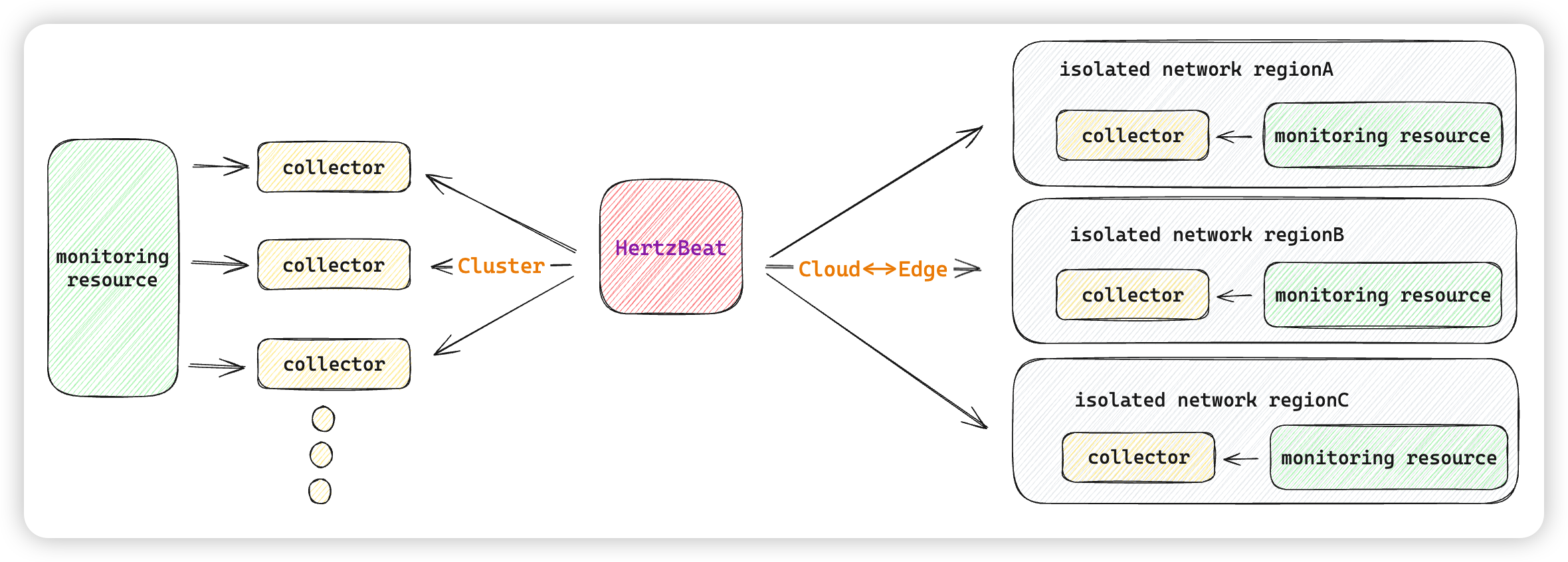
-
Download installation package
Download the collector package that matches your deployment mode:
- JVM collector package:
apache-hertzbeat-collector-xxx-bin.tar.gz - Native collector package for Linux or macOS:
apache-hertzbeat-collector-native-xxx-{platform}-bin.tar.gz - Native collector package for Windows:
apache-hertzbeat-collector-native-xxx-windows-amd64-bin.zip - Download Page
- JVM collector package:
-
Configure the collector configuration file
Unzip the installation package to the host eg: /opt/hertzbeat-collector
tar zxvf apache-hertzbeat-collector-xxx-bin.tar.gz
# or
tar zxvf apache-hertzbeat-collector-native-xxx-linux-amd64-bin.tar.gz
# or
unzip apache-hertzbeat-collector-native-xxx-windows-amd64-bin.zip
Configure the collector configuration yml file
config/application.yml: uniqueidentityname, runningmode(public or private), hertzbeatmanager-host, hertzbeatmanager-portcollector:
dispatch:
entrance:
netty:
enabled: true
identity: ${IDENTITY:}
mode: ${MODE:public}
manager-host: ${MANAGER_HOST:127.0.0.1}
manager-port: ${MANAGER_PORT:1158}Parameters detailed explanation
identity: (optional) Set the unique identifier name of the collector. Note that the name of the collector must be unique when there are multiple collectors.mode: Configure the running mode (public or private), public cluster mode or private cloud-edge mode.manager-host: Important, configure the address of the connected HertzBeat Server,manager-port: (optional) Configure the port of the connected HertzBeat Server, default 1158.
-
Start the service
Run
$ ./bin/startup.shorbin/startup.batfor the JVM collector package. Run$ ./bin/startup.shfor Linux or macOS native collector packages, andbin\\startup.batfor the Windows native collector package. -
Begin to explore HertzBeat Collector
Open the HertzBeat server dashboard at
http://<manager-host>:1157and confirm the new collector is registered.
The native collector package is suitable for monitoring types that do not rely on external JVM classpath extension.
See Native Collector Guide for package selection, package naming, and platform-specific trade-offs.
ext-lib-based JDBC driver loading is a JVM collector capability. The native collector package does not support loading external JDBC driver JARs from ext-lib at runtime.
If your monitoring depends on external JDBC drivers, use the JVM collector package instead of the native collector package. This currently includes:
- Oracle, which requires
ojdbc8and oftenorai18n - DB2, which requires
jcc - Any MySQL, MariaDB, or OceanBase deployment where you explicitly place
mysql-connector-jinext-liband want the JDBC path
Recommended deployment:
- Use the native collector package for HTTP, website, port, ping, similar non-JDBC monitoring types, and for MySQL, MariaDB, or OceanBase without
ext-lib - Use the JVM collector package when you need
ext-libdriver extension
HAVE FUN
FAQ
-
you need to prepare the JAVA environment in advance
Install JAVA runtime environment-refer to official website requirement:JDK25 ENV download JAVA installation package: mirror website After installation use command line to check whether you install it successfully.
$ java -version
  openjdk version "25.0.2" 2026-01-20
  OpenJDK Runtime Environment (build 25.0.2+8)
OpenJDK 64-Bit Server VM (build 25.0.2+8, mixed mode, sharing) -
According to the process deploy,visit http://ip:1157/ no interface Please refer to the following points to troubleshoot issues:
1:If you switch to dependency service MYSQL database,check whether the database is created and started successfully. 2:Check whether dependent services, IP account and password configuration is correct in HertzBeat's configuration file
hertzbeat/config/application.yml. 3:Check whether the running log has errors inhertzbeat/logs/directory. If you haven't solved the issue, report it to the communication group or community.